Optimizing a PostgreSQL Query to Increase by 99% Efficency !
Improving Performance and Indexing Strategies
7/20/2023
In this blog post, we’ll explore a real-world scenario about how a slow PostgreSQL query was debugged and then optimized to significantly improving its performance by 99%! And how you could do the same.
< We’ll cover the following topics: >
- analyzing the query execution plan output
- adding indexes to the database
- and important considerations for indexing strategies
< The Problem >
Recently, we encountered a performance issue in our frontend application, where a specific query took over 30 seconds to load. This halted development time to a crawl! So I decided to investigate the issue to see where a solution might be found.
Debugging the performance of a SQL query or a PL/pgSQL function can be a complex task. Many factors can influence the speed. First area to check was to dive into the query execution plan using PostgreSQL’s powerful EXPLAIN ANALYZE feature.
Postgres uses a query planner/optimizer to decide how to execute a query in the most efficient way. and sometimes this optimizer gets it wrong.
< EXPLAIN ANALYZE >
This command helps to identify the bottlenecks in your SQL query. It will provide detailed information about how the database executes the query, including the estimated cost, the actual time spent on each operation, and the number of rows processed at each step. This can help identify which parts of your query are slow.
< Detection of a Bottleneck >
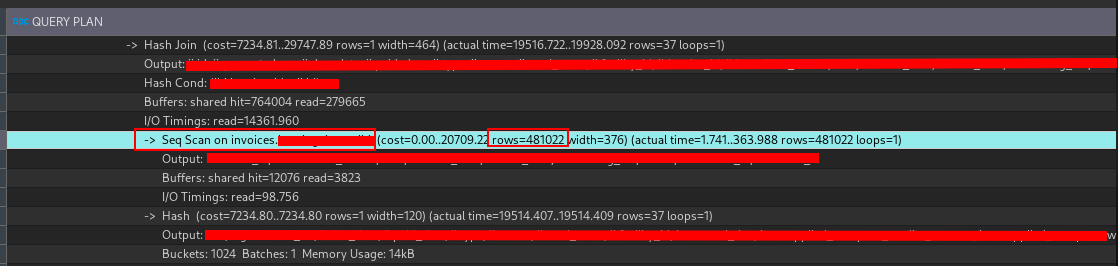
Output of EXPLAIN ANALYZE
The most important part that screenshot is:
Seq.scan on invoices … rows=481022: The number of rows that were processed by the query. Sequentially scanning through 481,022 rows is a lot of work for the database to do!
That Sequental Scan on the invoices table was the primary bottleneck! A sequential scans will scan every row in the table, resulting in slower performance. Almost half a million rows ! 481,022 rows to be exact !
This is a lot of rows to scan through, and it’s no wonder the query was taking so long to execute.
< Indexing as a optimization strategy >
Indexing is a common optimization technique to improve the performance of database queries. It is a way to reduce the number of rows that need to be examined by the database engine in order to satisfy a query. Indexes are used to quickly locate data without having to search every row in a database table every time a database table is accessed. Indexes can be created using one or more columns of a database table, providing the basis for both rapid random lookups and efficient access of ordered records.
You can think of an index as a table of contents for a book. Lets say you want to find specific topic in a book, you can go to the index, find the topic, and see on what page the topic is located.
Without an index, you would have to go through every page of the book to find your topic sequentially, which can be time-consuming.
< Adding Indexes >
To check if a column in a PostgreSQL table is indexed, you can use the \d command followed by the table name in the PostgreSQL command line. This command will show all columns in the table, their data types, and any indices on the table.
\d invoices.your_table_name
If invoice_id is indexed, you will see an entry in the “Indexes” section that includes invoice_id.
If invoice_id is not indexed, you will need to create one:
CREATE INDEX idx_invoice_id
ON invoices.your_table_name (invoice_id);
Now, after indexing invoice_id, check the output of EXPLAIN ANALYZE. You should now see “Index Scan using idx_invoice_id” instead of the previous “Seq Scan”. This indicates that the database is now using the index on invoice_id to find the necessary rows more efficiently.
< Result >
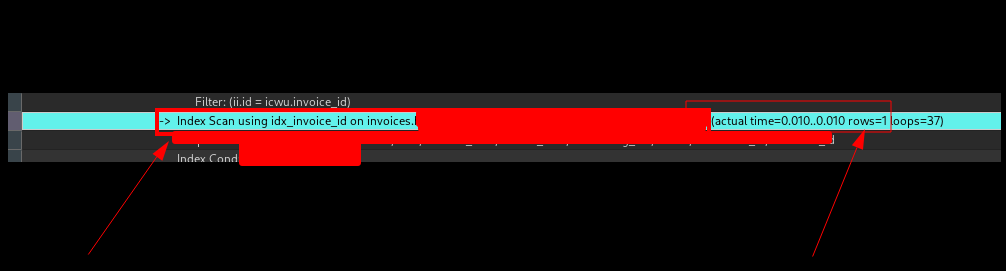
After indexing, we saw a massive improvement in the query execution time. The “rows” field indicates how many rows were returned after executing the operation: the fact that it’s gone down from 481,022 to 1 is another strong indicator that the query is now much more efficient.
With the Index Scan now in place, the query was able to quickly find the relevant rows without needing to scan every row in the table. The execution time per row dropped from approximately 134.2535ms to 0.0115ms. This translates to an efficiency increase of roughly 99.99%. A tremendous win for us! 🎉
< Considerations for Indexing >
Indexing is a trade-off between the speed of read queries and the speed of write queries. Indexes speed up read queries, but they slow down write queries. This is because when you insert a new row into a table, the database must also update each index on the table. So, the more indexes you have, the slower writes will be.
Also, importantly, indexes should be selective enough to reduce the number of disk lookups. In some cases, indexes may not be beneficial, especially for small tables where sequential scans are faster.
For very small tables, it can sometimes be faster to perform a sequential scan rather than using an index. This is because the cost of reading through the index and then fetching the data from disk can be higher than the cost of a sequential scan.